
Reevaluation Process

Reevaluation Review Planning Meeting

No Additional Data Needed/No New Disabilities Considered


If the team has determined that no additional data is needed, the Case Manager will proceed with completing the Prior Written Notice (PWN) and Eligibility Determination.

The parent/guardian/adult student must be informed of their right to request a reevaluation. The IEP team must clearly communicate that, although no additional information is needed at this time for the current triennial reevaluation, the parent/guardian/adult student retains the right to request a reevaluation at a later date. If at a later date, the parent requests a reevaluation, the team would reconvene to begin a new Reevaluation Review process.

Participants of the Reevaluation Review Planning Team will sign the document either digitally or a hard copy. If a printed (hard) copy is signed the Case Manager will then upload the signed document within the IEP software system.

After completing the PWN, the Case Manager will select the Outcome for the Reevaluation Review process. If the Reevaluation Planning team determined no additional information is needed to determine eligibility the Case Manager should select “No Additional Information Needed - Eligibility Determination”, and select the meeting date as the End Date.

After entering the End Date and selecting the Outcome Recommendation, the Case Manager will finalize the Reevaluation Review process. The team can then continue with the Eligibility Determination process.

Eligibility Determination

The Eligibility Determination should not be opened/started until the Reevaluation Review process has been finalized.

It is not necessary to create a new meeting for the Eligibility Determination, unless the team will reconvene on a different date to determine eligibility. The Case Manager will lead the team in a discussion about whether the student continues to meet criteria for one or more disabilities and if the severity of the student’s disability indicates the continued need for special education services. The current IEP software auto populates the student’s previously identified disabilities for consideration. Always select “Yes” for the prompt “Disability Worksheet Needed?”. Selecting “Yes” will cause the IEP software system to generate the disability consideration questions for the team to consider. In this scenario, users may select “No” for the prompt “Enter Worksheet Data” for continuing categories of disability.
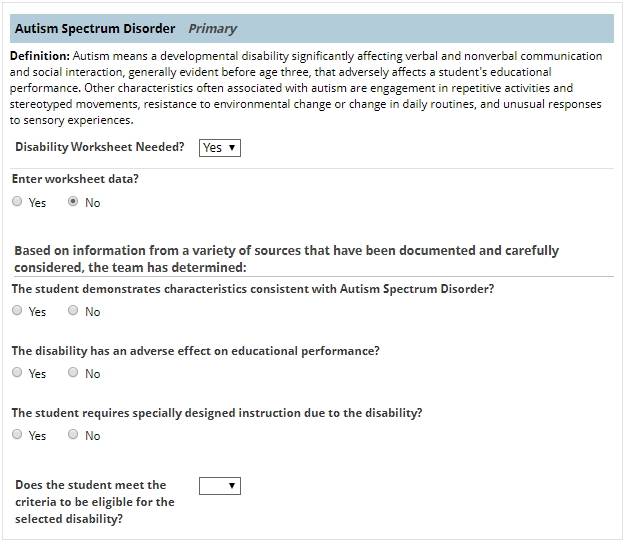
disability worksheet

The IEP team must proceed with completing the Disability Criteria Worksheet, ensuring that all required questions are fully addressed. As part of this process, the team must determine and document whether the student’s disability continues to have an adverse effect on educational performance. Additionally, the team must determine and document whether the student continues to require specially designed instruction as a result of the disability. For each disability area where the student continues to meet eligibility criteria, the Case Manager will document whether the disability is the Primary disability or a Secondary disability.

Next, the team will address the three Additional Consideration questions.
  • The determination is not the result of lack of appropriate instruction in reading, including the essential components of reading instruction.
  • The determination is not the result of lack of appropriate instruction in math;<.li>
  • The determination is not the result of Limited English proficiency of the student.

Note: All three must be yes in order for the student to be eligible for special education and related services.

The case manager will collect signatures from the meeting participants either digitally or by printing the document. If signatures are collected by printing the document, the case manager will upload the signed Eligibility Determination document in the IEP software system. After completing the PWN and uploading all signed documents, the user will enter the Outcome of the Eligibility Determination process as determined by the team, and enter the End Date. The End Date is the date of the team meeting .

Note: The IEP software system will complete a compliance check. If the eligibility determination compliance timeline was not met the user will be prompted to enter a reason and any appropriate comments after finalizing the Eligibility Determination process.

For additional information on conducting a reevaluation review planning meeting when additional data is needed, reference the Reevaluation Review Planning: Additional Data Needed page.

For additional information on conducting a reevaluation review planning meeting when no additional data is needed and NEW disabilities are being considered, reference the Reevaluation Review Planning: No Additional Data Needed/New Disabilities Being Considered page.

Reevaluation Process Reevaluation Plan Meeting No Additional Data/No New Disabilities Considered