




Thank you for visiting our Parents' Page.
 Parent Backpack is an online application that has replaced the PowerSchool Parent Portal. With Parent Backpack, you are able to view your child's grades, school attendance, lunch balance and class schedules when you are logged into the system. Parent Backpack works on any device and is mobile friendly. Parents are reminded that once they have created their online Parent Backpack account, they must link their students using their Student ID (found on their progress report, report card, or class schedule). After this process is complete, parents must then visit their child’s school and present their government issued photo ID in order for the school to approve their pending request.
Keeping you and our community healthy and safe, as well as maintaining mental well-being, have always been and remain our top priorities. In efforts to help our families have quick access to resources list please following the links below:
The district has established an e-mail account for parents to e-mail the district Transportation Department with questions or concerns they may have. The e-mail is transportconcerns@greenville.k12.sc.us. Please include your child's address, school, and phone number where they can be reached. Sevier's bus transportation is under the supervision of Taylors Bus Center at 864-355-7330. The GCS District Transportation contact number is 864-355-1289.
Front Car Line Instructional Video
Back Car Line Instructional Video
School doors open at 7:30am, classes start at 8:30am, and dismissal is at 3:25pm. On time arrival is very important to your child’s education.
For safety, all students must be dropped off and picked up ON CAMPUS. No student may be picked up or dropped off alongside the road on Belvue Ave., Piedmont Park Rd. or Sunnydale Dr. nor across the street at the Church.
Your actions as a driver impact the safety and efficiency of this system. Please be respectful of others and comply with all procedures and staff instructions.
Morning drop-off: All car riders must be dropped-off in the front driveway. Vehicles will stack quickly. Help keep Piedmont Park Rd. clear of vehicles turning into Sevier by pulling forward to the white stop bar before allowing your child to exit your vehicle. Between the hours of 7:45 - 8:30 drivers must turn right to exit the school.
Afternoon pick-up: All students will board vehicles on school property under the supervision of our staff.
Front Car Line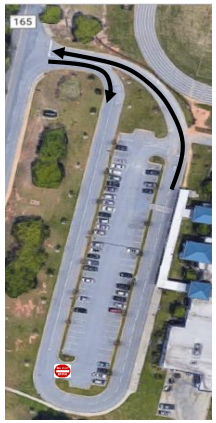
Back Car Line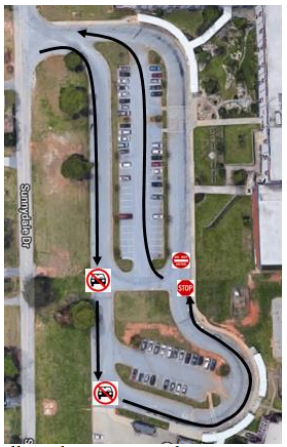
Anti-Idling Policy: Sevier Middle School has established a voluntary “anti-idling” policy. We ask that drivers turn off their engines while waiting in their vehicle to pick up their riders, weather permitting. Please park in the front parking lot if you are coming into the school.
No Phone Zone: While in carline, please stay alert by staying off your cell phone. Bus Rider Drop-off and Pick-up supervision. Busses arriving after 8:30am and 3:45pm will pull into the front driveway.
NOTE to ALL — If you have any change in your transportation arrangements you must submit a Transportation Change form to the Guidance Office. Thank you for your conscientious support.